Work Order Process: 8 Steps From Request to Closeout

A work order process is the path a maintenance need follows from the moment someone reports it to the moment the job is verified, documented and closed. The steps are well established. What decides whether the process works is how many hands the job passes through. When cleaning, pest control, repairs, construction and landscaping each have their own vendor, every work order becomes a separate trail of emails, invoices and sign-offs. When one contractor holds all of those trades under one contract, there is one place to send a request and one record to review. That is how we run facility maintenance at Nationwide Maintenance, and the steps below show why it matters at each stage.
TL;DR
- A work request says something needs attention. A work order is the approved, scoped, assigned job that comes out of it.
- The process runs in eight stages: identification, approval and prioritization, planning and estimating, procurement, scheduling, execution, inspection and follow-up, closeout.
- A work order only helps later if it records priority, location or asset, assignee, actual labor and materials, and the cause of the problem.
- Every extra vendor adds handoffs. One contract covering several trades keeps the request, the approval and the closeout in one chain.
- Review overdue and repeat work weekly, and treat every closed order as maintenance history.
Table of Contents
- Work request vs. work order
- The work order process in eight stages
- What a work order should contain
- Setting priority and target dates
- Preventive, corrective and inspection orders
- Tracking, closing and learning from completed work
- Why one contract simplifies the work order process
- Our perspective
- Put one team behind your work orders
- FAQ
- Sources
Work request vs. work order
The two terms get mixed up, and the mix-up causes real trouble. A work request is a notification. A tenant, store manager or nurse reports a leaking ceiling tile, a cracked parking lot section or a pest sighting. It has no authority behind it yet. A work order is what exists after someone with approval authority has reviewed the request and decided the work will be done. The U.S. Army Corps of Engineers describes it that way in its maintenance workflow standard: the need is identified, a manager validates it and sets its priority, and only then does planned work begin. NASA’s facilities maintenance requirements say a work order directs execution of requested work once it is approved, prepared by planners and estimators.
The gate between the two matters. If every request became a job automatically, crews would chase duplicates and low-value tasks while urgent ones waited. Duplicates and invalid requests are cancelled at the approval stage, and the requester is told.
A purchase order is a different document. It is a buyer’s commitment to pay a supplier for goods or services, while a work order describes the work itself. On a job that needs outside parts or a subcontractor, the work order usually comes first and the purchase order follows once the spend is confirmed.
The work order process in eight stages
The Army Corps’ December 2025 standard is the clearest published sequence from a U.S. federal agency, and it maps onto any commercial portfolio. Here it is in plain terms, with where each stage tends to go wrong.
1. Work identification
Someone notices a need. It might be an employee, a tenant, an inspector on a walkthrough or a scheduled preventive task coming due. The request should capture what is wrong, exactly where, how urgent it seems and who to contact. Where it goes wrong: vague requests such as “bathroom issue” that force a second visit just to learn what the job is.
2. Approval and prioritization
A manager checks that no duplicate exists, cancels invalid or duplicate requests, notifies the requester and sets a priority. Valid work that is deliberately deferred is kept on the books with an estimate and a target start, not forgotten. Where it goes wrong: everything is marked urgent, so nothing is.
3. Planning and estimating
The scope is defined: tasks, labor, materials, access needs and any engineering or funding input. Small repairs need a few lines. A build-out or a large exterior project needs real planning. Where it goes wrong: estimates made without a site visit.
4. Procurement
Materials and outside services are ordered. This is where the purchase order comes in, if one is needed. Where it goes wrong: parts arrive after the crew has been scheduled, and the visit is wasted.
5. Scheduling
The job is placed on the calendar around facility conditions: store hours, patient schedules, tenant access, weather for exterior work. Where it goes wrong: a trade shows up before the trade ahead of it has finished.
6. Execution
The work is performed. The standard requires the responsible professional to record actual labor, materials, services and work log notes. Where it goes wrong: crews finish the job and skip the notes, so cost and history are guesses afterward.
7. Inspection and follow-up
Someone checks the quality of the work against the order. If it passes, the status moves to completed. Where it goes wrong: closing a job because the crew says it is done, without anyone on the property side looking.
8. Closeout
Checklists and documents are collected, all actuals are verified, the status becomes closed and the record is locked against edits. For construction work, closeout includes drawings and manuals; our guide to construction closeout documents lists what an owner should collect, and the punch list guide covers the last-defect walkthrough.
Preventive tasks skip stage 1. They are generated by the schedule, not by a person reporting a problem.
What a work order should contain
A work order that cannot answer who, what, where, when and how much is a note, not a record. Federal and state facility programs are specific about the minimum.
The General Services Administration’s national work order guide requires completed orders to document a description, who reported the issue, the reported date and time, the actual time and labor, the service type, the failure class and problem code, the asset number and detailed work logs. The same guide treats this data as the base for performance tracking and continuous improvement. Utah’s 2026 facilities maintenance standards ask for the request date, repair category, priority, description, assigned shop or technician, cost and time, completion date and all notes.
For most commercial properties, a practical template looks like this:
- Unique number and date. So any invoice or complaint can be traced to one job.
- Location and asset. Site, floor, room, equipment or lot section.
- Description and requester. What is wrong and who to call about access.
- Priority and target date. Set at approval, not at submission.
- Assignee. The crew or vendor responsible.
- Scope, materials and estimate. Including any outside purchases.
- Safety and access notes. Lockout requirements, after-hours entry, occupied-space precautions.
- Actuals. Hours, materials and cost when finished.
- Cause and follow-up. What was found and whether more work is needed.
- Approval and close date. Who signed off, and when.
The cause field is the one most often left blank, and it pays off most. A note naming the failed part tells the next technician where to look first.
Setting priority and target dates
Priority turns approval into a schedule. Jefferson Lab, a U.S. Department of Energy facility, publishes a simple model in its facilities workflow: low priority has a 28-day target, medium 14 days, and high 7 days. Utah’s standards use a more granular ladder, from emergency and same day through within three days and within a week to as time allows.
Adapt the idea to your property type:
| Priority | Typical examples | Target |
|---|---|---|
| Emergency | Flooding, no heat in occupied space, security breach | Immediate response |
| High | Pest sighting in a food area, failed restroom fixture, hazardous parking lot surface | Same day to a few days |
| Medium | Door hardware, damaged ceiling tile, scheduled floor refinishing | Within one to two weeks |
| Low | Cosmetic touch-ups, planned improvements | As time allows, with a target date |
The examples and targets are a starting model you set per site; the published ladders above are the references to compare against. Define the categories in writing before the first request arrives, so approvers apply them the same way every time.
Preventive, corrective and inspection orders
The GSA guide separates three kinds of work orders, and a healthy process uses all three:
- Corrective orders document the repair or replacement of something that failed.
- Preventive orders are recurring, usually calendar-based, and are created by the schedule without anyone reporting a problem. The Jefferson Lab process creates them automatically on a release date ahead of the due date.
- Inspection orders cover checking completed work and correcting any deficiencies found.
The ratio is the signal. A portfolio that is mostly corrective is running on emergencies. Shifting recurring tasks such as filter changes, roof drain checks, pest monitoring visits and exterior washing onto a preventive schedule moves work out of the emergency queue. Our preventive maintenance checklist gives a template to start from.
Tracking, closing and learning from completed work
Tracking means knowing at any moment what is open, who has it and what is late. Three habits make that possible.
- One record per job, with a number and a status that everyone uses the same way: requested, approved, in progress, on hold, completed, closed, cancelled.
- A backlog review on a fixed day. Utah’s standards call for regular backlog review so no request goes unheeded, and require a note explaining why any work order older than 30 days is incomplete. Copy that rule. It forces someone to say what is blocking the job.
- A hold status that means something. Waiting on parts or on tenant access is different from nobody having started. Separating them shows where the process, not the crew, is stuck.
Closing is the other half. Before a work order moves to closed, verify the actual labor and materials, confirm the work passed inspection and attach the documents. The Army Corps standard calls the maintenance history captured from each job the main value gained from it, second only to the quality of the job itself. Repeat orders on the same asset, the same restroom or the same entrance are the pattern to look for. A third call on the same problem in a season is a reason to plan a replacement or a deeper fix, not to send another crew for the same patch.
Why one contract simplifies the work order process
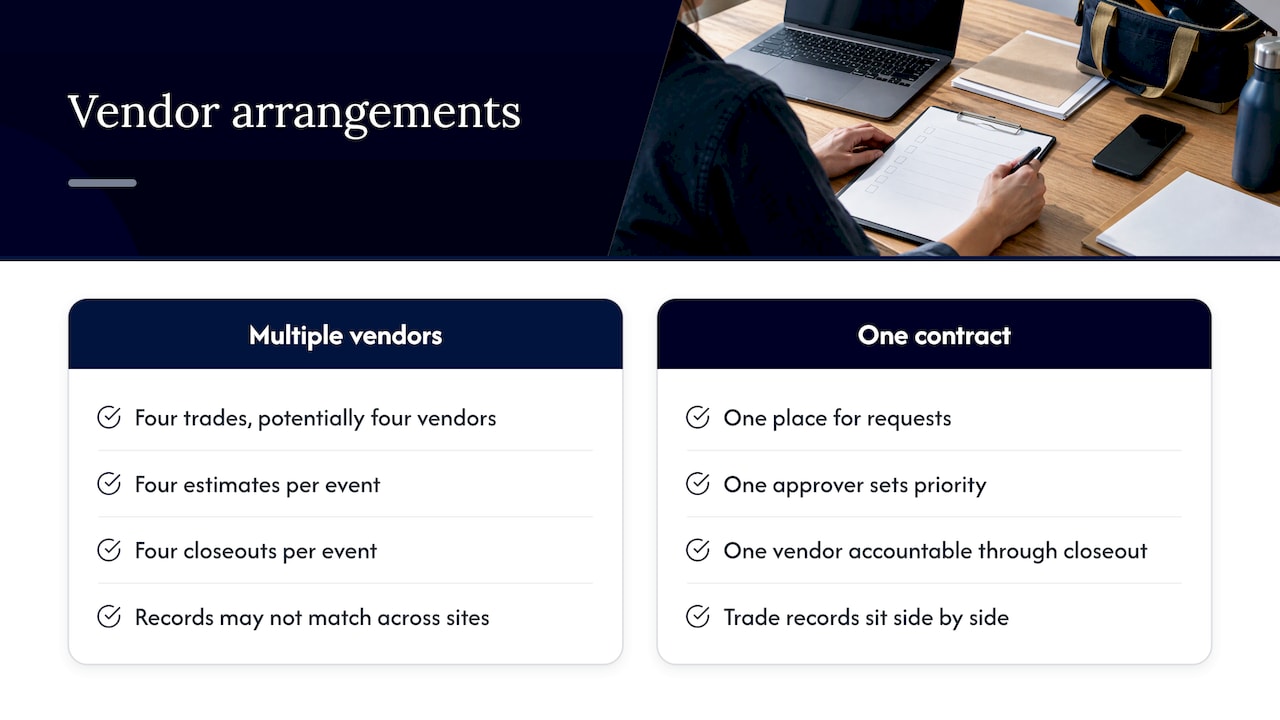
Every stage above involves a handoff: requester to approver, approver to planner, planner to crew, crew to inspector. With one vendor per trade, each of those handoffs multiplies. A leaking roof drain, the stained ceiling it causes, the pest activity that follows the moisture and the pressure washing of the entrance afterward are four trades and potentially four vendors, four estimates and four closeouts for what was one event.
A multi-location portfolio feels this most. Store 12 and Store 31 may each have a different cleaner, pest vendor and repair contractor, each with its own way of reporting completion. Comparing performance across sites is nearly impossible because the records do not match.
With one contract covering commercial cleaning, pest control, construction, landscaping, power washing, parking lot services and emergency response, the sequence stays the same across all trades. A request goes to one place, one approver sets priority, and one vendor is accountable through inspection and closeout. The records for different trades sit side by side, so a weekly review can see the whole property, not a slice of it. That is also why retail chains aiming for consistent presentation and property managers juggling several buildings tend to consolidate vendors.
It also shortens the emergency path. When the problem is urgent, an after-hours call should not begin with deciding which vendor owns it. We provide 24/7 emergency facility response under the same contract as routine work.
Our perspective
Most work order trouble we hear about is not a software problem. It is a vendor problem. The approval step is fine, the template is fine, and then three different companies are responsible for pieces of one incident and nobody owns the whole closeout.
That is why we built Nationwide Maintenance around a single contract. Cleaning, pest control, construction, landscaping, power washing and parking lot work sit under one roof, with more than 30 years of experience behind them and 24/7 emergency support. A facility manager can replace a stack of vendor relationships with one, and a property team gets one chain of accountability from request to closeout.
We are also a WBE-certified vendor, which matters for organizations with supplier diversity requirements: consolidating vendors does not have to mean giving up that commitment.
Our advice is simple. Write your priority rules down, keep the cause field filled in, review the backlog weekly, and give each job a single accountable owner.
Nationwide Maintenance.
Put one team behind your work orders
If your properties are in New York, New Jersey or Connecticut and your work orders currently cross several vendors, we can take the trades under one agreement. We handle commercial cleaning, pest control, power washing, parking lot services, handyman work, construction and landscaping, and we serve property managers, retail, healthcare, government and school facilities. Start with our facility maintenance for property managers page, or contact us through Nationwide Maintenance.

FAQ
What are the steps in a work order process?
The Army Corps of Engineers defines eight: work identification, approval and prioritization, planning and estimating, procurement, scheduling, execution, inspection and follow-up, and closeout. Small jobs compress several of these into a single sitting, but each decision still happens. Preventive work skips identification because the schedule creates the order.
What should a work order include?
At minimum: a unique number, location or asset, a description, priority, assignee, scope and estimate, safety notes, actual labor and materials, the cause found, and the approval and completion dates. Federal and state programs such as GSA and Utah require most of these fields on completed orders.
How do you manage work orders across several locations?
Use the same statuses, priority definitions and required fields at every site, and review overdue, on-hold and repeat jobs on a fixed weekly day. Consistency is easier when one contractor handles the trades across all locations, because the records follow the same format.
What is the difference between a work order and a purchase order?
A work order describes the job and authorizes it. A purchase order commits money to an outside supplier for parts or services. Work that needs external spending will usually have both, with the purchase order number linked back to the work order.
Sources
- U.S. Army Corps of Engineers EP 1130-2-557, Workflow and Work Order Requirements (December 2025)
- NASA NPR 8831.2E, Chapter 5
- GSA PBS National CMMS Desk Guide (June 2019)
- Utah Facilities Maintenance Standards (2026)
- Jefferson Lab Facilities CMMS Workflow Management Process
Recommended
Need this handled at your facility?
Our crews cover commercial properties across New York, New Jersey, and Connecticut.